Add a payment point
Tap to Pay on iPhone gives an eligible DOJO customer another way to take payment without buying a separate terminal.
Another way to get paid. No extra card machine.
When you need another payment point, a compatible iPhone can do the job. Tap to Pay on iPhone accepts contactless payments through the DOJO for business app, without a separate terminal.
Free consultation · No obligation
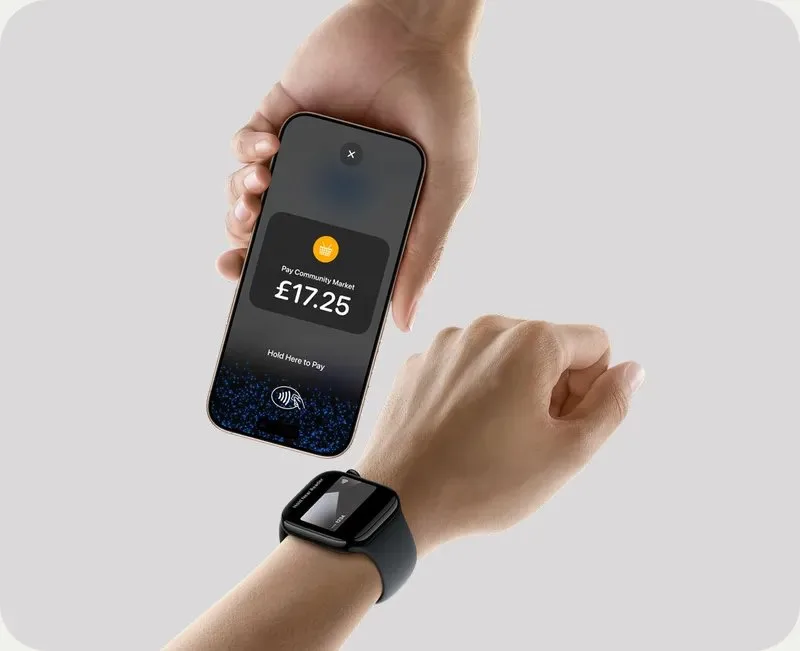
Tap to Pay on iPhone turns a compatible iPhone into a way to accept contactless payments through the DOJO for business app. It gives you another payment point without a separate card machine, whether you are serving a queue, working at a pop-up or taking payment away from the counter. You need a DOJO payments account and a supported iPhone.
A supported iPhone is already part of the way you work and contactless acceptance is enough.
DOJO customer eligibility, iPhone model/iOS, card acceptance limits, connectivity, transaction fees and staff/device access.
Take contactless payments on a device you may already carry, with the DOJO for business app.
Tap to Pay on iPhone gives an eligible DOJO customer another way to take payment without buying a separate terminal.
Customers can pay with supported contactless debit and credit cards, Apple Pay and other digital wallets. Some cards may not be accepted and transaction limits can apply.
Enter the purchase amount in the app and present the iPhone to the customer. The app confirms when the card has been read and the transaction is being processed.
A compatible iPhone can support contactless payment at a table, pop-up or additional service point. It needs a working connection and enough battery for the job.
Tap to Pay on iPhone uses the iPhone's built-in security features. Apple does not store card numbers on the device or its servers when a payment is processed.
Use the product where its payment and service features will help your team most.
Could be considered when you already have a compatible iPhone and do not need a separate terminal. Compare the fees with your payment volume.
A phone can move with the person taking payment. Check reception, battery management and who is authorised to use the business account.
A phone option may be useful alongside a terminal, subject to account eligibility and terms. Confirm the backup workflow before relying on it.
If the team needs another way to take contactless payments, Tap to Pay on iPhone can use a compatible phone rather than another terminal. Check the account and device requirements before adding it to your service plan.
An extra payment point is useful only if the phone is available when the team needs it. Think about whether you will use a dedicated business iPhone or a phone that also handles calls and other work. Battery life, connectivity and account access become part of the service plan. Those practical details help you decide whether a phone is a useful addition to your existing card machines.
Compare the payment methods and receipt process as well as the hardware saving. Tap to Pay on iPhone is a contactless option; a dedicated card machine may be more suitable where customers need to insert a card or receive a printed receipt. We can explain the account and device requirements alongside the charges, so you can judge the complete arrangement.
Compare the role of each option with the job you need it to do.
| Option | What it does | Question to ask |
|---|---|---|
| Tap to Pay on iPhoneTHIS PRODUCT | Contactless card and wallet payments on a compatible iPhone through the DOJO for business app. | DOJO customer eligibility, iPhone model/iOS, card acceptance limits, connectivity, transaction fees and staff/device access. |
| DOJO Go Max ↗ | Portable dedicated terminal with receipt printer. | Do you need printed receipts or a separate customer-facing device? |
| DOJO Pocket ↗ | Portable ordering and payment device. | Do staff need to take orders as well as payments? |
| DOJO Wired ↗ | Fixed powered counter or kiosk terminal. | Are payments mainly at one fixed checkout? |
Related pages: DOJO Go Max · DOJO Pocket · DOJO Wired · Tap to Pay on iPhone
See the device, processing and connection costs together.
Ask whether Tap to Pay on iPhone is included in your DOJO plan, what each transaction costs and whether any minimum charges apply. Confirm the account and device requirements before relying on a phone to take payments.
Understand card processing fees ↗The equipment arrangement and account charges included in your quote.
The rates and any charges for authorisations, refunds or disputes.
Any EPOS connection, setup, service or connectivity costs.
The term, notice period and any exit charges under the proposed arrangement.
A free consultation does not make equipment or payment processing free.
Tell us what you use today. We will work through the device, the supported connection and the quote with you.
We help confirm that the model and operating system meet current requirements.
Establish eligibility and permissions for the business and staff using the app.
Consider acceptance, receipts, refunds and connectivity before using it with customers.
Compare the written fee schedule with a dedicated terminal or your existing setup.
Answers about features, costs and getting started.
Ask about Tap to Pay on iPhone ↗A compatible iPhone and supported iOS version are required. Tell us the model you intend to use and we will help confirm the current requirements before setup.
No. A supported iPhone accepts the payment through the DOJO for business app. You also need an eligible DOJO payments account.
Yes. This service is for DOJO payments customers. We can help you establish account access and the applicable charges.
Supported contactless debit and credit cards and digital wallets, including Apple Pay. Some cards may not be accepted and transaction limits may apply.
This product is Tap to Pay on iPhone. If you use Android, we can help you compare the payment options available for your device and business.
We help you establish the transaction fees, account charges and any minimums in the current offer. Using a phone does not make payment processing free.
Check the network requirements before relying on the phone for payments. We can help clarify any account-specific offline functions and limits.
We can help you check how a phone-based payment option would sit alongside your terminal, including account access, reporting and charges.
Tell us whether you already use DOJO and which iPhone you have. We can explain eligibility, payment acceptance and the charges that apply.
No obligation · Terms depend on the provider’s written offer