Send the order while you are at the table
With a supported EPOS connection, staff enter the order on DOJO Pocket rather than walking it back to a separate till. Ordering functions depend on the EPOS provider and configuration.
Take the order. Take the payment. Stay with the customer.
When the tables are full, every trip back to the till takes someone off the floor. DOJO Pocket combines ordering and payment in one lightweight device, so your team can spend more of the service with customers.
Free consultation · No obligation
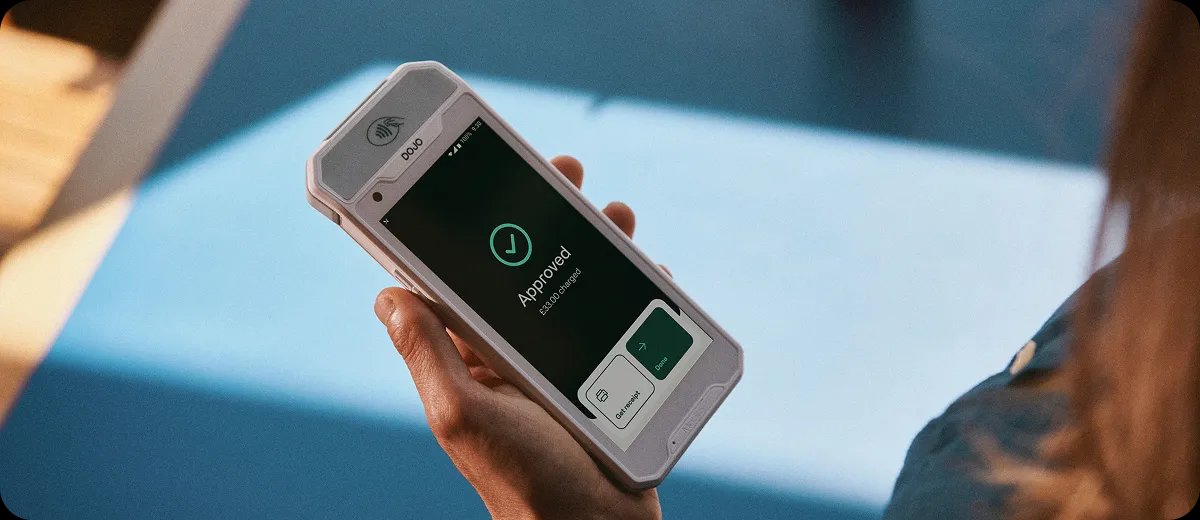
DOJO Pocket puts ordering and payment on the same handheld device. With a supported EPOS connection, staff can send an order through while they are with the customer, then take payment when the customer is ready. That means fewer trips to the till and more time on the floor, especially when the tables are full.
A mobile workflow where staff need to take orders as well as payment.
EPOS compatibility, supported order functions, network coverage, receipt options and the full quote.
Ordering, payment and digital receipts come together on a device staff can carry through the venue.
With a supported EPOS connection, staff enter the order on DOJO Pocket rather than walking it back to a separate till. Ordering functions depend on the EPOS provider and configuration.
The same device accepts card and contactless payments. Staff can finish serving one table without first finding a separate card machine.
At 143 g, DOJO Pocket is small enough to carry between tables. Its 4.95-inch screen keeps ordering and payment controls together in a handheld format.
Display the bill on screen and offer a receipt by email or QR code. Customers can leave with a record of their payment without waiting for a paper receipt.
DOJO Pocket connects to Wi-Fi or an available 4G network. That gives staff a mobile connection option when they are serving beyond the reach of the main router.
DOJO Pocket works with selected cloud-based EPOS integrations. Tell us your till provider and we will establish which ordering and payment functions your team can use.
Use the product where its payment and service features will help your team most.
When staff cover several tables, taking the order and payment on one device reduces the journeys between customers and the till.
DOJO Pocket gives the floor team ordering and payment tools while the counter team continues serving. The EPOS connection determines how those orders reach your system.
A handheld device with Wi-Fi and 4G can support service on terraces and in gardens, subject to reception. Plan charging and device handovers around your shifts.
Think about the journeys your team makes during a busy service. If staff can send an order and take payment from the same device, they can spend that time with the next table instead. A demonstration should show that complete journey using your EPOS.
The ordering connection is the main reason to choose DOJO Pocket over a payment-only terminal. If staff already take orders comfortably on another device, adding a second ordering tool may bring little benefit. If they are repeatedly leaving tables to enter orders, bringing that task onto DOJO Pocket addresses a recognisable part of the service. Start with that difference when comparing devices.
Receipt handling matters too. DOJO Pocket offers a digital receipt, while the DOJO Go Max has a built-in paper printer. Consider what your customers ask for and what the team needs during service. We can work through the ordering connection and receipt options together, so the decision reflects the whole customer journey rather than the size or weight of the device alone.
Compare the role of each option with the job you need it to do.
| Option | What it does | Question to ask |
|---|---|---|
| DOJO PocketTHIS PRODUCT | Take orders and payments on one handheld device with selected EPOS integrations. | EPOS compatibility, supported order functions, network coverage, receipt options and the full quote. |
| DOJO Go Max ↗ | Portable payment terminal with a built-in receipt printer. | Do staff need order entry on the payment device? |
| DOJO Wired ↗ | Fixed counter or kiosk terminal. | Will most payments happen at a fixed point? |
| Tap to Pay on iPhone ↗ | Contactless payments via a supported iPhone and DOJO app. | Would a phone-based payment-only setup cover the need? |
Related pages: DOJO Go Max · DOJO Pocket · DOJO Wired · Tap to Pay on iPhone
See the device, processing and connection costs together.
Your quote should bring together the device, processing rates and any EPOS integration or recurring service charges. We compare those with your current arrangement so you can judge the cost of giving the floor team ordering and payment on one device.
Understand card processing fees ↗The equipment arrangement and account charges included in your quote.
The rates and any charges for authorisations, refunds or disputes.
Any EPOS connection, setup, service or connectivity costs.
The term, notice period and any exit charges under the proposed arrangement.
A free consultation does not make equipment or payment processing free.
Tell us what you use today. We will work through the device, the supported connection and the quote with you.
Write down where an order is taken, sent and paid for.
Confirm exact EPOS supplier, software version and supported functions with the providers.
Check device, processing, service and contract charges in writing.
Agree who configures the till, devices, staff access and training before changing setup.
Answers about features, costs and getting started.
Check DOJO Pocket with your EPOS ↗DOJO Pocket is a handheld device for orders and payments. With a supported EPOS connection, your team can enter orders and take payment without using separate devices for each task.
It works with selected EPOS providers. Tell us which till system and software version you use, and we will help establish which ordering and payment functions are supported.
The battery specification is eight hours. Actual runtime varies with use and conditions; we help you plan device numbers and charging around the length of your shifts.
Yes, it can connect over Wi-Fi or available 4G. Coverage is still important, particularly in outdoor areas or rooms away from your router.
DOJO Pocket offers digital receipts by email or QR code. If your team needs a printer in the payment device, compare it with DOJO Go Max.
We help you review a written quote covering the device, processing rates, recurring charges, EPOS integration and contract terms. Your cost depends on the arrangement offered to your business.
Do not rely on offline acceptance as a fallback. We can help you establish the network requirements and any account-specific offline functions before you choose a setup.
If your team does not need to enter orders on the device, a payment terminal such as DOJO Go Max may suit the job. We compare the day-to-day task and full cost with you.
Tell us which EPOS you use and how your team takes orders today. We will check the available connection and explain the device and payment costs.
No obligation · Terms depend on the provider’s written offer