More room to see what matters.
The 6.5-inch screen gives staff and customers more space to read prompts and check the payment amount. During a demonstration, try the tasks you repeat most: entering an amount, splitting a bill and printing a receipt.
Card payments.
A clearer view.
A portable card machine with a bigger 6.5-inch screen, Wi-Fi and built-in 4G. For taking payments at the counter, around your premises and on the move.
Bespoke quote · Compatibility checked · Help with switching
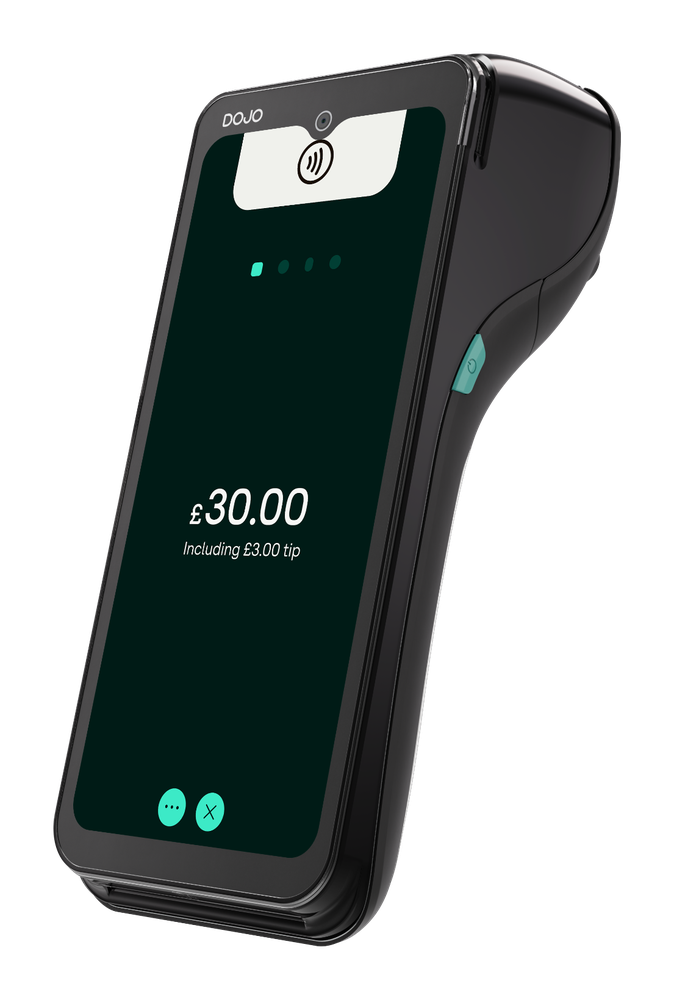
Dojo Go Max is a wireless card terminal for businesses that take payments in person. It combines a 6.5-inch touchscreen, a receipt printer and Wi-Fi/4G connectivity in one handheld device.
The useful question is how it fits your working day. Do you take payments at a fixed counter, at customers’ tables, or in different parts of your premises? Do you need your till to pass the payment amount to the terminal? Those details help determine the right device and integration.
Portable payments with a larger screen and printed receipts.
Your EPOS, signal coverage, total costs and contract terms.
Specifications are useful when they explain how the machine will work for your team and your customers.
The 6.5-inch screen gives staff and customers more space to read prompts and check the payment amount. During a demonstration, try the tasks you repeat most: entering an amount, splitting a bill and printing a receipt.
The terminal can switch between Wi-Fi and 4G. Check coverage where you actually take payments, including outdoor seating or different rooms. Mobile backup still depends on a usable network connection.
A built-in thermal printer keeps the payment and receipt together in one device. Check how receipt rolls are supplied and how your team will replace them during service.
Dojo supports EPOS integrations, but your particular system and configuration need checking. Confirm what will connect, which functions are available and whether your EPOS supplier charges for the connection.
Hardware details: Dojo’s published specifications ↗. Battery performance depends on use.
The right setup starts with where your staff work and what needs to happen before and after each payment.
If staff take payments around the venue, a portable terminal can suit that workflow. Test the screen, receipt handling and connectivity in your busiest areas. If you also want to take orders on the device, compare Dojo Pocket.
Think about whether a handheld device would be useful away from reception or the till. If payments always happen at one fixed point, compare the countertop option before choosing portability.
Built-in 4G is useful when venue Wi-Fi is unavailable. Confirm mobile coverage, charging arrangements and the terms for your trading pattern. A device specification alone cannot tell you how reliable reception will be at an event.
Start by checking whether staff need to take payment outside, whether the till sends amounts to the terminal, and whether Wi-Fi or 4G reaches the seating area. Try a real payment-and-receipt workflow during a demonstration. That gives you more useful information than choosing from screen size alone.
These devices serve different workflows. Use the comparison to decide what to discuss in your quote.
| Device | Main role | Question to ask |
|---|---|---|
| Dojo Go Max THIS PRODUCT | Portable in-person payments with a larger screen and receipt printer. | Do I need to take payments around the premises? |
| Dojo Pocket ↗ | A portable device for orders and payments, with compatible EPOS integration. | Do staff need to take orders as well as payments? |
| Dojo Wired ↗ | Integrated payments at a fixed countertop or kiosk. | Will payments always happen at one fixed point? |
| Tap to Pay ↗ | Contactless payments using a compatible iPhone. | Could a phone-based option meet my payment needs? |
Product roles: Dojo’s product range ↗. Features and compatibility should be confirmed for your setup.
Try the Go Max alongside your current device before deciding to upgrade. Compare screen readability, the tasks your staff repeat and how it connects to your till. Ask about the total upgrade cost and any effect on your existing agreement. A newer device is worthwhile when the practical improvement justifies the cost for your business.
Compare the full payment setup,
rather than a headline rate alone.
Your written quote should explain the hardware arrangement, processing rates, ongoing charges and contract terms. Ask which costs vary with card type or transaction method, and which are fixed.
Understand card processing fees ↗Is the device purchased, rented or included in an offer? What happens when the agreement ends?
What applies to each card type? Ask about authorisation, refunds, chargebacks and integration charges where relevant.
Which service or compliance charges apply? Check minimum charges and any conditions attached to an offer.
Confirm the term, notice period, exit charges and any eligibility conditions for switching support.
A free consultation does not mean the terminal or payment processing is free.
Start with your current statement, terminal and till. We can use those to discuss what needs to change.
Tell us how you trade, where you take payments and which EPOS system you use. Include any specific problems you want to solve.
Use a recent processing statement and the proposed written quote to compare the arrangement, including fixed charges and contract conditions.
Check compatibility, delivery, setup, staff familiarisation and the timing of the switch before agreeing a change.
Still unsure which device fits?
Bring your setup to the conversation.
It supports Wi-Fi and built-in 4G. A usable mobile connection can provide a backup when Wi-Fi is unavailable. Check reception at the locations where you will use the device.
4G backup and offline payments are different things. Do not assume transactions can be accepted with no connection at all. Ask Dojo which options and conditions apply to your account and device.
Dojo supports a range of EPOS integrations. Confirm your exact supplier, software and configuration, along with available functions and any integration charges, before switching.
Yes. Go Max has a built-in thermal receipt printer. Ask how receipt rolls are supplied and included in your arrangement.
Start with the workflow: Go Max is a portable payment terminal; Pocket combines orders and payments with a compatible EPOS setup. If you only need payments, compare the practical handling and full cost before adding ordering functionality.
Confirm the settlement schedule in your written agreement, including weekends, bank holidays and any account-specific conditions. Authorising a card payment and receiving the money in your bank account are separate steps.
Check your existing notice period and exit charges first. Any contribution towards switching costs depends on the applicable offer and eligibility. Get the conditions confirmed before cancelling your current arrangement.
A recent merchant statement, your current hardware details, your EPOS supplier and an outline of how you take payments. Those make the conversation more specific than comparing an advertised rate alone.
Tell us a little about how you trade. We can discuss the device, integration and costs together.
No obligation · Bespoke quote
This page explains Dojo Go Max and highlights questions to confirm before choosing a payment setup. Hardware facts were checked against Dojo’s published product information on 14 October 2026. Prices, eligibility and contract conditions depend on the written provider offer. This page is general information, not financial advice.